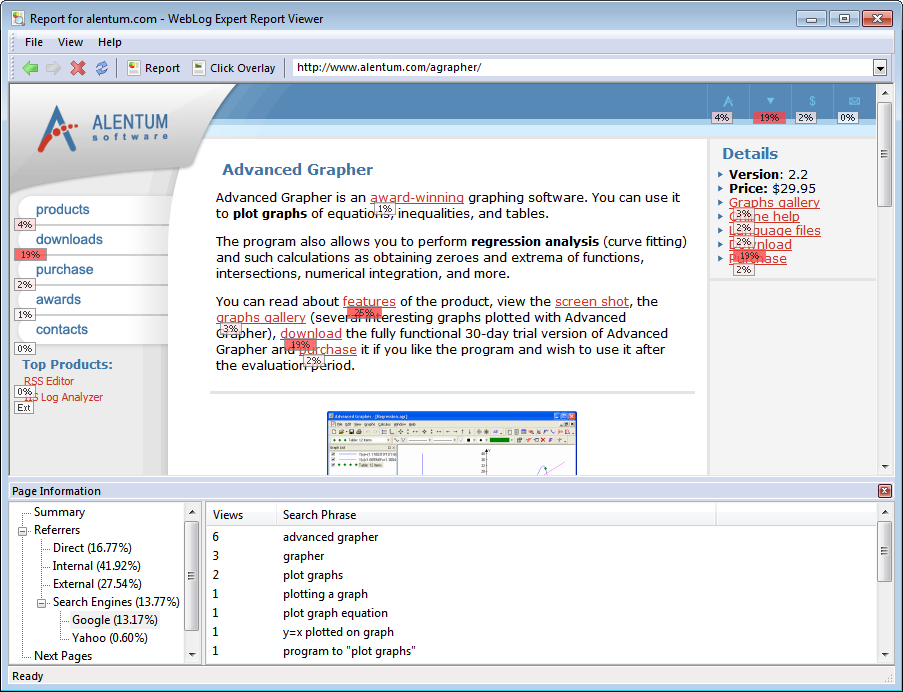
The click overlay
report shows visual statistics on clicked links. The report can be
enabled in when the HTML report format
is selected. The report is shown in WebLog Expert Report
Viewer:
 WebLog Expert Report Viewer
is provided with WebLog Expert Std/Pro/Ent or can be
WebLog Expert Report Viewer
is provided with WebLog Expert Std/Pro/Ent or can be
 downloaded separately for free.
When the
Create click
overlay report setting is enabled
in the profile properties, Report.wler file is
created in the output folder. This file contains information on
visited pages including clicked links, referrers, search engines,
etc. It also contains name of the HTML report index page
(e.g. index.htm) that is
opened in the viewer at startup. Files with the .wler extension are
associated with WebLog Expert Report Viewer so you can open them
from Windows Explorer without a need to reanalyze the
profile.
You can either click
the Click Overlay button on the toolbar or click the Click Overlay
report category in the HTML report
contents to view this report. You can also click the
Report
button on the toolbar to return to the
HTML report.
Click Overlay
Link marks
show percent of times visitors clicked them while viewing the
current page. You can hover cursor over a mark to view tooltip
containing exact number of clicks for the link.
If a page contains
multiple links to the same resource (URL), the same number of clicks and percentage is shown for
all of them since it is not possible to determine which particular
one of these links was clicked.
You can refresh the
marks using the command from the main
menu or by pressing the F6 key. It may be useful if your site uses
DHTML so some links may be hidden or shown after the page is
loaded. You can also use the
command to hide or show the marks.
Page Information
The
Page
Information panel contains
statistics on the current page:
|
|
General statistics.
|
|
|
Page views when visitors came to this page
typing its URL directly, from bookmarks, etc. so no referrer is
recorded.
|
|
|
Page views when visitors came from other pages
of the analyzed site.
|
|
|
Page views when visitors came from other sites
(not including search engines).
|
|
|
Page views when visitors came from search
engines.
|
|
|
Pages viewed by visitors after leaving the
current page. Link marks reflect information from this table.
|