You can select
report format in :

 If you need to create
report in multiple formats at a time, choose
"Multiple" as report destination and create destinations with
different report formats.
If you need to create
report in multiple formats at a time, choose
"Multiple" as report destination and create destinations with
different report formats.
There are report
format settings available in . You can
also set custom report format in by clicking the Custom button
near the Format combo
box.
|
|
|
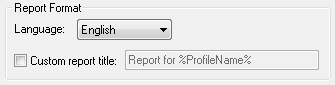
Report language.
|
|
|
Use custom report title. You can use the
%ProfileName% (profile name) and
%DomainName% (domain name specified
in the profile properties) macros in the report title.
|
|
|
|
|
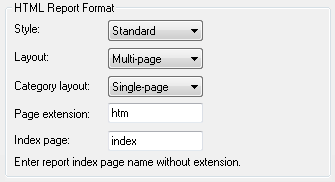
Report style.
|
|
|
Generate multi-page or single-page reports.
|
|
|
Generate report categories on multiple or
single page.
|
|
|
File extension used for report pages.
|
|
|
Report index page name without extension.
|
|
|
|
|
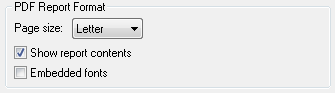
Page size for generated reports.
|
|
|
Show report contents when opening report
files.
|
|
|
Embed used fonts in generated PDF files. Font
embedding causes the PDF files to be larger but they can be viewed
correctly even if used fonts aren't installed on computer where the
files are viewed.
|
|


