|


|


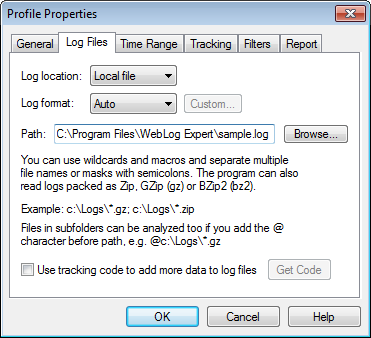
The program is an Apache log analyzer and IIS log analyzer. There are several ways for the program to get the logs:
·Local
file. You can specify either a log file name or a wildcard
for log file names. You can also use date macros. Multiple file names/masks can be
separated with semicolons.
You can also analyze log files that match
a wildcard from a folder and its subfolders by adding the @
character before the log path.
If you wish to exclude certain files from
analysis, you can specify their path with the # character before
it. ·FTP. Download logs via FTP. Click here to get more information about the FTP settings. ·HTTP. Download logs via HTTP. You can use date macros and separate multiple URLs with semicolons. You can also specify username and password if necessary. ·Multiple. Get logs from multiple sources. If you wish to analyze log files from load balanced servers, you need to create one or several log locations for each server and check the Analyze log files from load balanced servers setting. You can also specify names of load balanced servers that will be shown in the Access Statistics > Servers report. [Requires Professional or Enterprise Edition]
You can use a special | |||